Hammer 5 Tools: Difference between revisions
No edit summary |
No edit summary |
||
| Line 1: | Line 1: | ||
{{ | {{Stub}} | ||
| | |||
| | {{lang}} | ||
| | |||
| | {{infotable | ||
|download=https://github.com/dertwist/Hammer5Tools | |||
|type=t2 | |||
|engine=3 | |||
|platform={{win|4}} | |||
}} | }} | ||
=== | [[File:Hammer5tools header.png|750px|frameless|center]] | ||
== Tools == | |||
<gallery perrow="3" widths="500px" heights="330px"> | |||
Hammer5Tools qsAhC58g1F.png|Loading Editor | |||
Hammer5Tools qsAhC58g1F.png|SoundEvent Editor | |||
Hammer5Tools qsAhC58g1F.png|BatchCreator | |||
Hammer5Tools qsAhC58g1F.png|Hotkey Editor | |||
Hammer5Tools qsAhC58g1F.png|SmartProp Editor | |||
</gallery> | |||
==== Installation ==== | ==== Installation ==== | ||
| Line 12: | Line 26: | ||
Unzip the archive and launch `hammer5tools.exe`. | Unzip the archive and launch `hammer5tools.exe`. | ||
==== Workflow ==== | ==== Workflow ==== | ||
| Line 46: | Line 43: | ||
===== Default Hammer5Tools Preset ===== | ===== Default Hammer5Tools Preset ===== | ||
Default Hammer5Tools preset includes smartprops and practical mapping setup | Default Hammer5Tools preset includes smartprops and practical mapping setup | ||
[[File:Hammer5tools default preset.png|frameless|760px|Default Preset]] | |||
==== Adding Custom Presets ==== | ==== Adding Custom Presets ==== | ||
| Line 61: | Line 58: | ||
When the game is selected, the corresponding folder opens in the explorer: | When the game is selected, the corresponding folder opens in the explorer: | ||
* `Counter-Strike Global Offensive\game\csgo_addons\##ADDON_NAME##` | * `Counter-Strike Global Offensive\game\csgo_addons\##ADDON_NAME##` | ||
==== No Steam Logon Fix ==== | ==== No Steam Logon Fix ==== | ||
| Line 69: | Line 64: | ||
==== NCM Mode ==== | ==== NCM Mode ==== | ||
NCM (`--nocustomermachine`) is a launch parameter that enables baking lightmaps with CPU and smartprops compilation. However, when CS2 is launched with this parameter, default assets will not be visible; only your custom assets will appear. | NCM (`--nocustomermachine`) is a launch parameter that enables baking lightmaps with CPU and smartprops compilation. However, when CS2 is launched with this parameter, default assets will not be visible; only your custom assets will appear. | ||
{{sdktools/source2|0}} | |||
{{sdktools|0}} | |||
[[Category: Third Party Tools]] | |||
[[Category: Third Party Source 2 Tools]] | |||
Revision as of 06:49, 3 November 2024


| Hammer 5 Tools | |
|---|---|
| Download | |
| Type | Third Party Tool |
| Engine |  Source 2 Source 2 |
| Platforms |  Windows Windows |

Tools
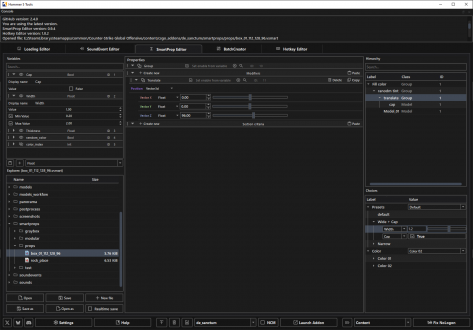
Loading Editor
SoundEvent Editor
BatchCreator
Hotkey Editor
SmartProp Editor

Installation
Download the latest version from this link: [1](Github)
Unzip the archive and launch `hammer5tools.exe`.
Workflow
The entire workflow revolves around add-ons, similar to Valve Hammer 5. All tools operate using the selected add-on to streamline the process.
Import and Export Addons
Exporting and importing addons in zip format.
Create New Addon
Creating new addons with custom presets.
Default Hammer5Tools Preset
Default Hammer5Tools preset includes smartprops and practical mapping setup

Adding Custom Presets
To add a custom preset, go to settings and click on the "Presets" button to open your presets folder. Copy the `valve_default` preset and modify the `.vmap` file. Alternatively, you can copy an existing project and rename the necessary files to match the add-on name in the format `xxx_mapname_xxx`.
Opening Game and Content Folders
When the content is selected, the corresponding folder opens in the explorer:
- `Counter-Strike Global Offensive\content\csgo_addons\##ADDON_NAME##`
When the game is selected, the corresponding folder opens in the explorer:
- `Counter-Strike Global Offensive\game\csgo_addons\##ADDON_NAME##`
No Steam Logon Fix
This script restarts Steam and launches the current addon. This is optional and can be configured in the settings.
NCM Mode
NCM (`--nocustomermachine`) is a launch parameter that enables baking lightmaps with CPU and smartprops compilation. However, when CS2 is launched with this parameter, default assets will not be visible; only your custom assets will appear.
| ||||||||||||||||||||||||||||||||||||||||||||||||||


| |||||||||||||||||||||||||||||||||||||||||||||||||||||||||||