Blender Source Tools: Difference between revisions
Jump to navigation
Jump to search


 Bug:Triangles which occupy the same three vertex positions as a previous triangle have their vertices reset to around the mesh's origin (at least for SMD export).
TomEdwards (talk | contribs) No edit summary |
m (Setting bug notice hidetested=1 param on page where the bug might not need tested in param specified) |
||
| (91 intermediate revisions by 28 users not shown) | |||
| Line 1: | Line 1: | ||
{{LanguageBar|title = Blender Source Tools}} | |||
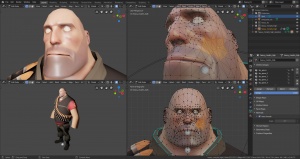
[[File:Blender-tf2modelbeingedited.jpg|thumb|A ''[[Team Fortress 2]]'' model being edited]] | |||
[[File:BST-sceneconfig.jpg|thumb|Scene configuration]] | |||
{{ | {{blendersrctools|4|}} allows [[Blender]] to import and export [[SMD]] and [[DMX]] files. | ||
== | ==Features== | ||
* Supports {{gldsrc|4}} and {{src|4}} | |||
* One-click export and import | |||
* [[SMD]] and [[DMX]] support | |||
** SMD export can be optionally tailored to suit GoldSrc's limitations{{elaborate}} | |||
* Support for most Blender features | |||
* Export multiple objects to one file | |||
* Compile [[QC]]s automatically | |||
* Import complicated models by [[QC]] | |||
{{bug|hidetested=1|Triangles which occupy the same three vertex positions as a previous triangle have their vertices reset to around the mesh's origin (at least for SMD export).}} | |||
# | ==Installation== | ||
# In Blender | # [http://www.blender.org/download/ Install the latest version of Blender (minimum 4.1, or later).] Or [steam://rungameid/365670 Install Blender from Steam] (AppID: 365670) | ||
# | # [http://steamreview.org/BlenderSourceTools/ Download the Source Tools.] '''Don't''' unzip. | ||
# In Blender: | |||
## Select {{key|Edit}} > {{key|Preferences}} | |||
## Move to the {{key|Add-ons}} tab | |||
## Click {{key|Install...}} at the top-right of the window | |||
## Find the downloaded zip file and select it (Double click) | |||
## 'Blender Source Tools' should be the only add-on shown if installed correctly. Check the box to the left and wait a moment for activation to complete. | |||
{{tip|To change the default export format to [[SMD]], change {{code|export_format}} in {{file|__init__|py}}.}} | |||
== | ==Community== | ||
* [http://steamcommunity.com/groups/BlenderSourceTools#announcements News and changelog] | |||
* [http://steamcommunity.com/groups/BlenderSourceTools/discussions Forums] | |||
==Documentation== | |||
* [[Blender Source Tools Help]] | |||
== | * [[Animation in Blender|Skeletal animation]] | ||
* [[Flex animation|Flex animation (shape keys)]] | |||
* [[Modeling props with Blender|Modelling Props with Blender]] | |||
* [[Compiling a model]] | |||
* [http://steamcommunity.com/sharedfiles/filedetails/?id=245723825 Steam Community Guide covering all model features in great detail] | |||
{{sdktools|0}} | |||
[[Category:Blender]] | |||
[[Category:Modeling]] | |||
[[Category:Third Party Tools]] | |||
* | |||
[[Category:Blender]] [[Category:Modeling]] | |||
Latest revision as of 06:14, 20 May 2025


A Team Fortress 2 model being edited

 Blender Source Tools allows Blender to import and export SMD and DMX files.
Features
- Supports
 GoldSrc and
  Source
 - One-click export and import
- SMD and DMX support
- SMD export can be optionally tailored to suit GoldSrc's limitations[Elaborate?]
- Support for most Blender features
- Export multiple objects to one file
- Compile QCs automatically
- Import complicated models by QC
Bug:Triangles which occupy the same three vertex positions as a previous triangle have their vertices reset to around the mesh's origin (at least for SMD export).Installation
- Install the latest version of Blender (minimum 4.1, or later). Or Install Blender from Steam (AppID: 365670)
- Download the Source Tools. Don't unzip.
- In Blender:
- Select Edit > Preferences
- Move to the Add-ons tab
- Click Install... at the top-right of the window
- Find the downloaded zip file and select it (Double click)
- 'Blender Source Tools' should be the only add-on shown if installed correctly. Check the box to the left and wait a moment for activation to complete.


Community
Documentation
- Blender Source Tools Help
- Skeletal animation
- Flex animation (shape keys)
- Modelling Props with Blender
- Compiling a model
- Steam Community Guide covering all model features in great detail
| |||||||||||||||||||||||||||||||||||||||||||||||||||||||||||


