
Water


 Split
SplitWater is a Pixel shader available in all  Source games.


It creates water that realistically reflects and refracts the world, and that can flow throughout a map.
 Tip:Water does not need to use the Water shader! If a less realistic effect is desired, or the water volume is oddly shaped, other shaders can be used, such as LightmappedGeneric or Refract. The method for creating the materials is the same.
Special behaviour
- Expensive and cheap
Watermaterials fall into two groups: expensive and cheap. Expensive water reflects and refracts the world in real-time, while cheap water uses an $envmap and does not refract. Users can disable expensive water rendering through their video options, so always place env_cubemap entities throughout a map.- Above and below
Wateractually requires two materials: one for above the surface and one for below. These materials are independent of each other, but for proper effect need to correlate in most areas.- Flow Mapping
- Water can flow in arbitrary directions. It's very tricky to create a flow map by hand however, and the tool Valve used internally hasn't been released.
Shader parameters
Textures
 Warning:The $BaseTexture will only be lightmapped if there is no $FlowMap!Warning:When not using a $FlowMap, this parameter does not work with projected textures or $LightMapWaterFog!
 Note:In games before
  , the surface is a combination of fog color, animated bump map, reflection and refraction.Tip:If a BaseTexture is necessary in earlier games, and real-time reflections are not necessary, then the Refract shader could be used instead.Note:Not setting this in the VMT will automatically force it to 1. If not defined, a warning will appear saying
 Need to set $abovewater for material x$reflecttexture, $abovewater and $envmap disabled, but can otherwise do whatever it wants. Tip:Add %notooltexture to the bottom material to hide it in the texture browser (not in  ).Note:If the above water material does not have reflections, refractions, or $underwateroverlay: $abovewater can be omitted, $nocull can be used, and $bottommaterial can be set to the same material as the abovewater material.
effects\water_warp01. Requires $abovewater to be 0.Note:This is technically not a parameter on the water shader, meaning it can be abused for other unintended purposes! The overlay may still be applied even when the underwater material is told not to render ( $no_draw)$bumpmap), and a bump map for DirectX 9 and above ($normalmap). These should be animated unless the water is to be perfectly still or you're using a flow map, which makes an animated bump map redundant.
- Note:The
$normalmapparameter is unique to theWatershader, and uses a normal map. A du/dv map is used for $bumpmap when using theWatershader. The$dudvmapcommand is obsolete.Tip:Use $bumptransformwith the TextureScroll proxy to move the normal map in pre-2006 engine branches.
$bumpframe affects $normalmap, which should be pointing to a bump map.- The default position is
center .5 .5 scale 1 1 rotate 0 translate 0 0.centerdefines the point of rotation. Only useful ifrotateis being used.scalefits the texture into the material the given number of times.2 1is a 50% scale in the horizontal X axis while the vertical Y axis is still at original scale.rotaterotates the texture counter-clockwise in degrees. Accepts any number, including negatives.translateshifts the texture by the given numbers..5will shift it half-way. 1 will shift it once completely over, which is the same as not moving it at all.
- Note:All values must be included!
 Bug:Scaling the texture may cause odd issues where the Texture Lock tool in Hammer will not actually lock the texture in place. [todo tested in ?]
- Bug:Rotating textures applied on brushes will rotate around the map origin (confirm: Orangebox engine only?). A fix for this is to change the center position in the VMT to the brush's origin. [todo tested in ?]
In  and 's Shadercode it will bundle up $Reflect/$RefractAmount into a single float4 to save some instructions, like so:
"[$ReflectAmount, $ReflectAmount, $RefractAmount, $RefractAmount]" This is pretty much $Scale but with two more components.
 's Shadercode explains :
"The flashlight on the water surface is basically the diffuse flashlight * waterfogcolor * g_flFlashlightTint.
g_flFlashlightTint is tweakable in cases where the water fog color is really dark and the flashlight doesn't show up, etc."
Fog
Note:This parameter does not exist on the shader itself, the logic behind it is handled somewhere else. Important: If this parameter is not defined in a VMT, the shader will force its value to
 "[1 0 0]" and spew an error message saying Material x needs to have a $fogcolor.Warning:
Cheap water treats this parameters as a linear value where 0.0 is 0% and 1.0 is 100%.
Expensive water treats this parameter as a Gamma value,
and due do this, each component ( red, green and blue respectively ) can not go above 1.0 or below 0.0 ( on expensive water )
x^(1/2.2)Tip:While expensive water cannot, cheap water can go higher than 1.0, achieving a more "neon" effect.- Warning:Must be 0 for edge fading to work properly.
Note: Bumped Lightmaps are only enabled when a $BaseTexture has been defined, without it, a regular Lightmap will be used instead.Warning:This feature does not exist for cheap water.Reflection
Warning:
This parameter is in Gamma space on expensive water, meaning it will be converted to linear before being sent to the shader.
x^(1/2.2)- Note:Don't use this on underwater materials[Why?].
$envmap for reflections.$envmap. Refraction is assumed to be opaquely the water fog color.water_lod_control entity settings or the user's settings.- Note:Requires a sky_camera entity to be placed in the map, otherwise this might cause crashes.
- Bug:Does not do anything in any engine branch. [todo tested in ?]
Bug:Does not work properly in 
 . [todo tested in ?]
Refraction
- Tip:Specify
$refracttexturewithout$reflecttextureto get real-time refraction on$envmapreflections.
Warning:It is recommended that you set this to white or something close to white so that edge transitions work properly on DX9.Warning: This parameter is in Gamma space, meaning it will be converted to linear before being sent to the shader.To calculate the eventual linear value that the shader is supplied with, apply the formula
x^(1/2.2)- Warning:Underwater materials only; this will cause buggy behavior on any material with
$abovewaterset to 1.
$pseudotranslucent is enabled. At 0, the water is completely transparent, while at 1 the water is completely opaque.Flowing water
$scroll1 "[<normal X> <normal Y>]"(in all games since )
)$scroll2 "[<normal X> <normal Y>]"(in all games since)- If
$scroll1is defined and X is not zero, two more instances of the normal map will be drawn in such a way that they are merged together. The first layer is 7x larger and rotated 45°; the second is 2x larger and rotated 90°. The parameters specify the speed and direction that the extra layers will move. (Valve's materials usually contain a third number, but it doesn't have any apparent effect and is most likely obsolete.)

Flow maps


$normalmap. Valve generates their flowmaps with Houdini.
- Video of the effect. For technical details, see Alex Vlachos' SIGGRAPH 2010 paper and Valve's GDC 2011 paper.
Warning:Using this parameter with $BaseTexture will make the $BaseTexture not be affected by lighting.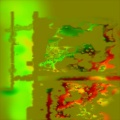
A flow map texture.
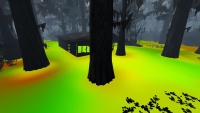
The flow map texture in-engine, shown with $flow_debug 1.
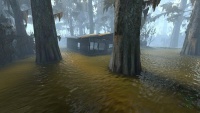
The result in-engine.


$flow_uvscrolldistance.Bug:Although the flow map will show up in Hammer, it may not be in the correct place! Don't rely on Hammer's view for alignment. [todo tested in ?] Black Mesa parameters.
Basetexture Flow
 for the sludge and debris in test chambers. The alpha channel of the
 $basetexture acts as a mask for the reflection; darker values are more reflective, while lighter values are less reflective.
- Note:From onwards, the opacity of the
$basetextureis controlled by the alpha channel of the flow map.
$color_flow_uvscrolldistance.- Todo: Better explanation
Authoring a flow map

Overall, trying to create a flow map manually is a nightmare. Painting the flow map, fitting it into the world, and painting foam, is extremely difficult.
But if you do want to give it a try, flow direction is read from the red and green channels of the flow map. 50% tone means no movement.
The texture scale of any faces using a water texture with a flow map appear to have a direct correlation on the flow map. The fewer water faces or planes you use the easier the process of authoring a custom flow map will be (selecting all of your water faces and using 'treat as one' when using the fit scaling may also be an option)
- Red channel
- X axis
- Green channel
- Y axis
- Alpha channel
- Controls
$basetextureblending from onwards.
- There are now tools to assist in painting flowmaps.
- Flow field editor from algoholic.eu : http://algoholic.eu/another-flow-field-editor-update/ [dead link]
- Flowmap generator (paid): http://www.superpositiongames.com/products/flowmap-generator
- Creating flowmaps using Houdini (UDK) : https://www.dropbox.com/s/ii2x077vj64lyhl/Water%20Flow%20For%20UDK.pdf [dead link]
Other
Important:Planar reflections doesn't work with this.WaterLOD proxy- This connects the water_lod_control entity in a level to the water’s internal parameters. This must be declared in the material for the LOD mechanisms to work properly.