env_cascade_light


For help, see the VDC Editing Help and Wikipedia cleanup process. Also, remember to check for any notes left by the tagger at this article's talk page.
env_cascade_light is a logical entity available in  Black Mesa.
 Class hierarchy Class hierarchy
|
|---|
| CCascadeLight |

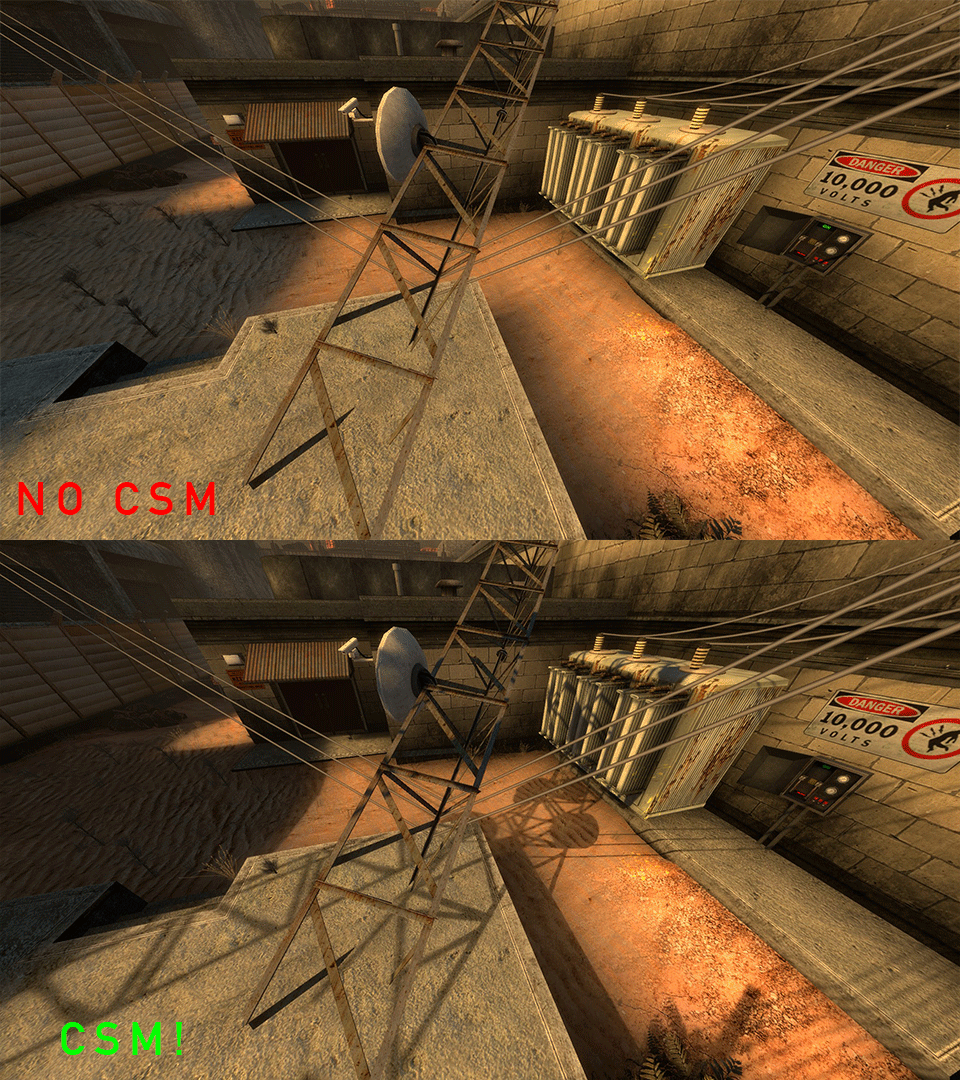
It casts an extremely accurate shadow map via the tools/toolsskybox texture, augmenting the lighting cast by light_environment with real-time shadows. This form of shadow mapping is known as Cascaded Shadow Maps, or CSM for short, which works by rendering very detailed shadow maps which becomes a lower and lower resolution depending on the distance the viewer is from the surface, similar to mipmaps. Some games automatically add this entity to the map, but it can be placed manually as well.
 Note:Although you can toggle this entity, you can have only one env_cascade_light present in your level. Any others will not work.
 Important:
- You still need to have a light_environment in your map as well to create lightmap based lighting, which is not done by this entity. CSM relies upon a fifth channel in the lightmap to mask dark and light areas.
 Xengine's implementation requires the
 -CascadeShadowsand-StaticPropLighting3parameters in VRAD for CSM to work correctly.- Due to lighting changes in Xengine, this entity has many additional parameters.
Keyvalues
- Name (targetname) <string>
- The name that other entities refer to this entity by, via Inputs/Outputs or other keyvalues (e.g.
parentnameortarget).
Also displayed in Hammer's 2D views and Entity Report. - See also: Generic Keyvalues, Inputs and Outputs available to all entities
- Light Color (color) <color255>
- This is the color of the sunlight. For
 Counter-Strike: Global Offensive, the color is automatically copied from the light_environment.
 Bug:In Black Mesa, do not use a color value that differs from what is written in light_environment entity, otherwise the cascade light will not work properly.
- Max shadow distance (maxshadowdistance) <float>
- Maximum dynamic shadow distance. Higher values are slower, default on PC is 400 units.
- Use light_environment's angles (uselightenvangles) <boolean>
- If true, the CSM shadow angles are automatically taken from a light_environment's angles. If false, this entity's Pitch Yaw Roll is used.
- LightRadius1 (LightRadius1) to LightRadius3 <float>
- Used for controlling shadow softness in cascades 1, 2, and 3.
- Depthbias1 (Depthbias1) to Depthbias3 <float>
- DepthBias for cascades 1, 2, and 3.
- Slopescaledepthbias1 (Slopescaledepthbias1) to Slopescaledepthbias3 <float>
- Slope DepthBias for cascades 1, 2, and 3.
- ViewModelDepthbias (ViewModelDepthbias) <float>
- DepthBias for viewmodel cascade.
- ViewModelSlopescaledepthbias (ViewModelSlopescaledepthbias) <float>
- DepthBias for viewmodel cascade.
- CSM_Volume_Mode (CSMVolumeMode) <choices>
- Use Manual mode for better performance.
- 0: Auto: Static cache will update once every 10 frames (approx) covering max shadow distance or whole map around player.
- 1: Manual : Static cache area coverage and updates are managed via Cascade Shadow Mapping Volumes.
- Start Disabled (StartDisabled) <boolean>
- Stay dormant until activated (with the
Enableinput).
Inputs
- SetAngles <string>
- Sets the direction shadows cast in.
- Note:Affects nothing.
- LightColor <color255>
- Changes color of the sunlight.
Bug:Doesn't work as expected. With Counter-Strike: Global Offensive's implementation, the color only changes on static props, not on world geometry or dynamic objects. It only changes the shadow color (only in world geometry, not in models), with no change upon reloading the game. With Xengine's implementation, the only thing you can do is change shadows color to turquoise and change the intensity of these shadows, however this doesn't effects shadows on the viewmodel.
 Portal 2: Community Edition uses Counter-Strike: Global Offensive's implementation of CSM Portal 2: Community Edition uses Counter-Strike: Global Offensive's implementation of CSM
|


 )
)LightColorScale!FGD
- Deprecated.
Boosts the color of the sunlight. Non-functional, only resets the Light Color. - Bug:Affects nothing in Xengine.
- SetCSMVolume
- Set CSM Volume via trigger volume.
- SetCSMVolumeToSceneBounds
- Set CSM Volume to scene bounds.
- SetCSMVolumeViaCSMVolumeEntity <targetname>
- Set CSM Volume to CSM Volume Entity.
- Start Disabled (StartDisabled) <boolean>
- Stay dormant until activated (with the
Enableinput).
Cascade Shadow Mapping Volumes
Black Mesa provides very powerful optimization feature, called Cascade Shadow Mapping Volumes (CSM volumes for short). Initially, there were 2 different modes for rendering shadow maps for static cascade, which type to use - determines the value from the property, the property is CSM_Volume_Mode. CSM volumes allow you to automatically limit rendering of cascade shadows, swap areas there you want to have static cascade shadows (this is cascade shadows from static props with world geometry (brush entities as well) and also change value for Max shadow distance property.
CSM_Volume_Mode property can have 2 different values:
- Auto - you will not be able to swap areas there you want to have static cascade shadows, value from Max shadow distance property never changes, static cascade shadows will also disappear with dynamic cascade shadows. Good enough if map isn't very open space or if it's not too big.
- Manual - static cascade shadows rendering areas depends on values from the inputs, value from Max shadow distance property also depends on values from the inputs. This allows you to save many FPS for maps with big open space areas (especially for Xen levels).
There are 3 different inputs for this feature, which create 3 different ways to use CSM volumes.
The first input is SetCSMVolume. This input changes CSM volume and sets min and max bounds via trigger_csm_volume entity. The size of trigger_csm_volume entity decides the size of the world or level to be rendered into CSM shadow maps. To use it, specify the area in which you want to set CSM volume via trigger_csm_volume entity (also works with trigger_multiple and other triggers for some reason). In trigger_csm_volume make the following output:
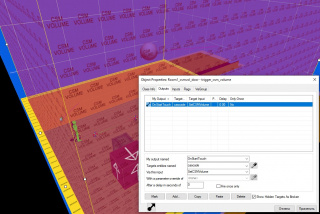
An example (instead of
cascadethere should be your env_cascade_light name).

In this way, static cascade shadows will not appear outside of min and max bounds.
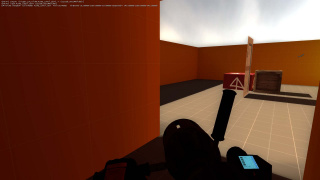
Example with console message about min and max bounds (this appear when you touch such CSM volume). Note that we have static cascade shadows in this area.
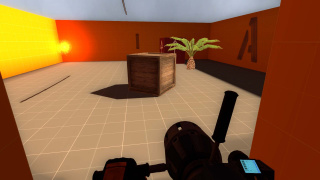
Example in room that is outside of the bounds. Note that we don't have have static cascade shadows in this area.


The second input is SetCSMVolumeToSceneBounds. It resets CSM volume to scene bounds. To use it, use the steps from the previous way, but replace SetCSMVolume input with SetCSMVolumeToSceneBounds input.
In this way, static cascade shadows never disappear, but dynamic still disappear.
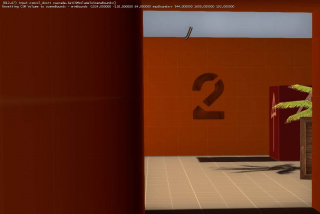
Example with console message about CSM volume reset (this appear when you touch such CSM volume). Note that we have static cascade shadows (from the tree and world geometry in this case), but we don't have dynamic cascade shadows (from the crate and the ropes in this case).

The third input and the last way is SetCSMVolumeViaCSMVolumeEntity. It does the same thing that does SetCSMVolume, but instead of trigger_csm_volume you are using env_cascade_volume entity. This way is deprecated, but still can be used in some very rare cases. env_cascade_volume is disabled in original FGD, you need to open base.cfg, find line 3169 and uncomment the code (or just use Enhanced Black Mesa FGD). The next step is to place the entity, give a name and set values for RadiusX, RadiusY and RadiusZ properties. What values to set to have required results ? Image that the entity position is brush center, and the values for the properties is the values what you see in 2D  Hammer window while some brush entity is selected. The last step is to add output for entity that will set CSM volume in this way, this can be trigger or any other entity. SetCSMVolumeViaCSMVolumeEntity requires parameter to work, the parameter is the name of env_cascade_volume which we set up early.
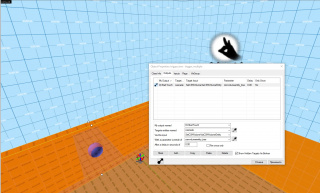
An example.

In this way, we get results that are identical to the result from SetCSMVolume input.
Important:All these features are fully disabled with ridiculous value for setting Sun Shadow Quality (cl_csm_qualitymode 4).Bug:All these features doesn't work properly in multiplayer.See also
- trigger_csm_volume - cascade volume brush entity
- env_cascade_volume - cascade volume point entity
- light_environment - baked static sunlight
- Shadow_control - dynamic shadows
- env_sun - glowing sun effect
- Skybox Basics
- Skybox lighting
- Advanced Lighting
- Effect flags (dynamic light effects)
- newLight_Dir - directional sun light with godrays only
- newLight_Point - point deferred light entity
- newLight_Spot - spot deferred light entity
- NewLights_settings - entity that changes deferred light settings
- New Specular - specular shader for new lights
- light_deferred - deferred light
- light_deferred_global - deferred global light
External links
- Example of CSM volumes (all 3 ways) in test map
- BlackMesa XenEngine: Part3 – CSM 2.0 (page from Black Mesa developer about their own CSM implementation)
- BlackMesa XenEngine: Part2 – How a Frame is Rendered (page from Black Mesa developer about new graphics features)
- BlackMesa XenEngine: Part1 – Heavily Modified Source Engine (page from Black Mesa developer about Black Mesa engine, better known as Xengine)