
Env bubbles: Difference between revisions
Jump to navigation
Jump to search


 Bug:Tying a toolstrigger brush to this entity will result in the entity being rendered in-game as a raw brush of said material, unless VBSP was compiled with
 Note:Used bubble sprite:
Note:In order to make it work in Portal 2, the bubble sprite material (
Note:Used bubble sprite:
Note:In order to make it work in Portal 2, the bubble sprite material (
SirYodaJedi (talk | contribs) (This is a bug. It worked "correctly" in GoldSrc (code set rendermode to 2), but this behavior was broken when porting to Source.) |
SirYodaJedi (talk | contribs) No edit summary |
||
| Line 1: | Line 1: | ||
{{lang|Env bubbles}}{{tabs|env_bubbles|goldsrc=1|source=1|main=source}} | |||
{{CD|CBubbling|file1=effects.cpp}} | {{CD|CBubbling|file1=effects.cpp}} | ||
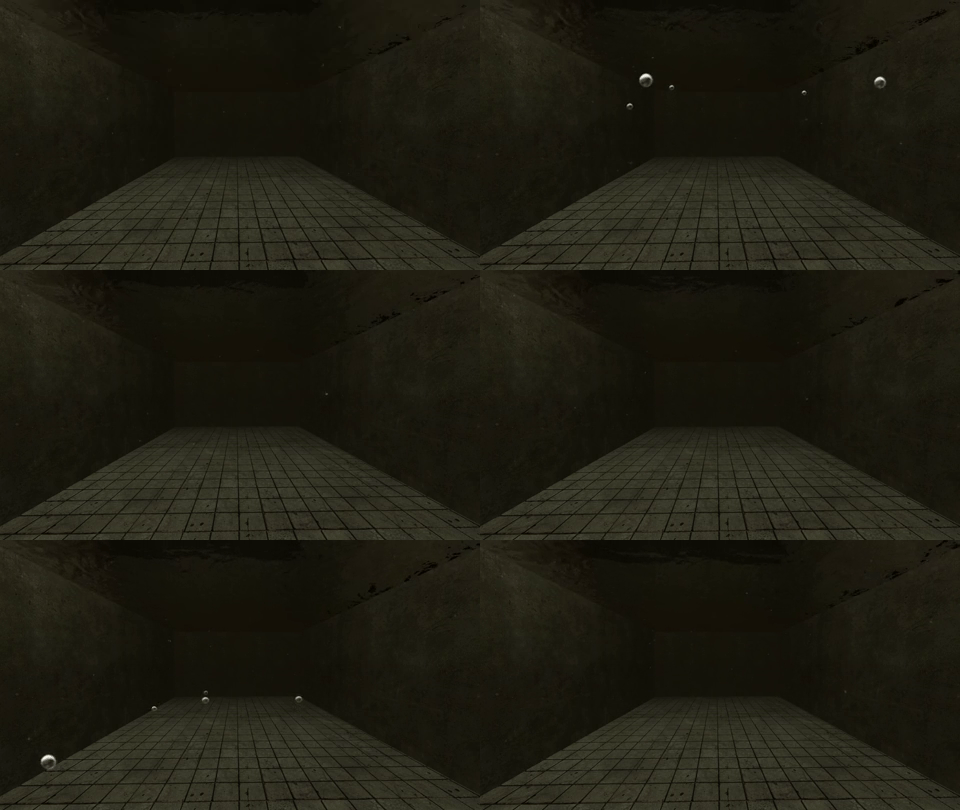
[[File:Env bubbles.gif|frame|right|280px|<code>env_bubbles</code> in game, with density set to 6 and frequency set to 2.]] | [[File:Env bubbles.gif|frame|right|280px|<code>env_bubbles</code> in game, with density set to 6 and frequency set to 2.]] | ||
Revision as of 07:59, 13 November 2025


 Class hierarchy Class hierarchy
|
|---|
| CBubbling |
| effects.cpp
|

env_bubbles in game, with density set to 6 and frequency set to 2.env_bubbles is a brush entity available in all  Source games. It is used to create a volume in which to spawn rising bubbles. The number and frequency of bubbles can be adjusted.
env_bubbles is obviously intended for use in water, but it can be used outside of water if such an effect is desired.
Bug:Tying a toolstrigger brush to this entity will result in the entity being rendered in-game as a raw brush of said material, unless VBSP was compiled with -nodrawtriggers. It should be set to Nodraw or Invisible instead.Note:Used bubble sprite: sprites/bubble.vmtNote:In order to make it work in Portal 2, the bubble sprite material (sprites/bubble.vmt) and texture (sprites/bubble.vtf) must be located in the /material/sprites folder and the TeamSpen's Hammer Addons installed, or at least its portal2.fgd located in the /Portal 2/bin folder.Keyvalues
- Name (targetname) <string>
- The name that other entities refer to this entity by, via Inputs/Outputs or other keyvalues (e.g.
parentnameortarget).
Also displayed in Hammer's 2D views and Entity Report. - See also: Generic Keyvalues, Inputs and Outputs available to all entities
- Bubble density (density) <integer>
- Bubble Count in Volume.
- Bubble frequency (frequency) <integer>
- Bubble emission frequency, in bubbles per second, values include negative numbers E.G. -10
- Speed of Current (current) <integer>
- The speed of the water current in the volume, used to move the bubbles.
Inputs
- Activate
- Activates the bubbles.
- Deactivate
- Deactivates the bubbles.
- Toggle
- Toggles the bubbles on and off.
- SetDensity <integer>
- Sets the bubble density.
- SetFrequency <integer>
- Sets bubble emission rate in bubbles per second.
- SetCurrent <integer>
- Sets current speed in inches per second.
Flags
- Start Off : [1]
See also
- env_embers - A similar entity.