
Mat wireframe: Difference between revisions
Jump to navigation
Jump to search


 Tip:In
  Counter-Strike 2 use the command r_drawviewmodel 0 to remove the player's viewmodel wireframe
Thunder4ik (talk | contribs) m (→top: Unicodifying, replaced: [[Image: → [[File:) |
Weevil bob (talk | contribs) ({{tip|In {{cs2|4}} use the command '''r_drawviewmodel 0''' to remove the player's viewmodel wireframe}}) Tag: Reverted |
||
| Line 18: | Line 18: | ||
This variable is a [[sv_cheats|cheat]]. | This variable is a [[sv_cheats|cheat]]. | ||
{{tip|In {{cs2|4}} use the command '''r_drawviewmodel 0''' to remove the player's [[viewmodel]] wireframe}} | |||
== See also == | == See also == | ||
Revision as of 01:15, 5 December 2025


mat_wireframe is a console variable available in all  Source games.

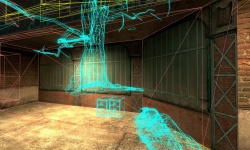
Mat_wireframe set to 1. Note the tree is being drawn by the engine even though it is behind the wall. This is an example of visibility issues.
A console variable for toggling a wire-frame mode that shows how much of the game world is being rendered.
It has four settings (0-3).
- mat_wireframe 0
- Off. Do not display any wireframes.
- mat_wireframe 1
- Displays all triangles the engine is rendering. The world brush polygons are rendered in pink.
- mat_wireframe 2
- Shows a simplified view of triangulated world brush polygons in green, using a hidden-line style rendering. Should not be used for visibility optimization since it does not accurately represent the full vis set, but can be useful for a less-cluttered display of nearby geometry in view.
- mat_wireframe 3
- Same as
mat_wireframe 1, but does not display triangulation of brush geometry. The world brush polygons are rendered in pink.
No matter what active mode, the non-world objects always use the following wireframe color codes:
- Models - Cyan
- Sprites - Green
- Displacements - Green
- Decals and Overlays - Yellow
This variable is a cheat.
Tip:In Counter-Strike 2 use the command r_drawviewmodel 0 to remove the player's viewmodel wireframe