User:Dr. Orange/Clock: Difference between revisions
Dr. Orange (talk | contribs) (wip) |
Dr. Orange (talk | contribs) (wip) |
||
| Line 4: | Line 4: | ||
== Creation == | == Creation == | ||
=== Step 1 === | === Step 1 === | ||
[[File:Clock model.png|200px|thumb|right|The clock model]] | |||
Create a <code>[[prop_dynamic]]</code> entity. Set its ''World Model'' to <code>models/props/clock.mdl</code>, its ''Pitch Yaw Roll'' to <code>-90 180 0</code> and set ''Disable Shadows'' to <code>yes</code>. | Create a <code>[[prop_dynamic]]</code> entity. Set its ''World Model'' to <code>models/props/clock.mdl</code>, its ''Pitch Yaw Roll'' to <code>-90 180 0</code> and set ''Disable Shadows'' to <code>yes</code>. | ||
{{clr}} | |||
=== Step 2 === | === Step 2 === | ||
| Line 20: | Line 22: | ||
Finally, create another <code>2w*10l*10h</code> with the front textured with <code>signage/clock/clock_milliseconds</code>. Tie it to a <code>func_brush</code> and set its ''Name'' to <code>brush_clock_milliseconds</code>. | Finally, create another <code>2w*10l*10h</code> with the front textured with <code>signage/clock/clock_milliseconds</code>. Tie it to a <code>func_brush</code> and set its ''Name'' to <code>brush_clock_milliseconds</code>. | ||
<gallery> | |||
File:Clock_brush_minutes.png|The minutes display brush | |||
File:Clock_brush_dots1.png|The first "dots" display brush | |||
File:Clock_brush_seconds.png|The seconds display brush | |||
File:Clock_brush_dots2.png|The second "dots" display brush | |||
</gallery> | |||
=== Step 3 === | === Step 3 === | ||
Revision as of 07:59, 8 August 2018
This tutorial will show how to create the clock seen in the very first test chamber of Portal. The clock can be used to indicate when a test element is activated after a delay, and is used in Portal to show how much time is left until the portals in the very first room open.
Creation
Step 1

Create a prop_dynamic entity. Set its World Model to models/props/clock.mdl, its Pitch Yaw Roll to -90 180 0 and set Disable Shadows to yes.
Step 2
Create a 2w*10l*10h brush aligned to the left within the clock model. Texture the front side with signage/clock/clock_minutes and press "Fit" to fit the texture on the brush. Tie this brush to a func_brush entity and set its Name to brush_clock_minutes.
Next create a 2w*2l*10h brush right next to the previous brush. Texture the front with signage/clock/clock_dots and fit the texture to the brush. Tie this brush to a func_detail entity.
After that, create another 2w*10l*10h brush next to the previous brush and texture the front with signage/clock/clock_seconds and fit the texture to the brush. Tie this brush to a func_brush entity and set its Name to brush_clock_seconds.
Create another 2w*2l*10h brush with the front textured with signage/clock/clock_dots and tie it to a func_detail.
Now create another 2w*10l*10h brush and texture the front with signage/clock/clock_centiseconds. Tie it to a func_brush and set its Name to brush_clock_centiseconds.
Next create another 2w*2l*10h func_detail brush with the front textured with signage/clock/clock_dots.
Finally, create another 2w*10l*10h with the front textured with signage/clock/clock_milliseconds. Tie it to a func_brush and set its Name to brush_clock_milliseconds.
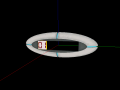
The minutes display brush
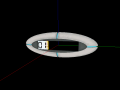
The first "dots" display brush
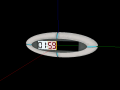
The seconds display brush
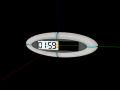
The second "dots" display brush


Step 3
Create an env_texturetoggle entity. Set its Name to texturetoggle_clock_minutes and set its Target Brush(es) to brush_clock_minutes.
Next create another env_texturetoggle and set its Name to texturetoggle_clock_seconds and set its Target Brush(es) to brush_clock_seconds.
After that, create a material_modify_control entity. Set its Name to mmc_clock_centiseconds, set its Parent to brush_clock_centiseconds, set its Material to modify. to signage/clock/clock_centiseconds, and set its Material variable to modify. to $frame.
Finally, create another material_modify_control entity and set its Name to mmc_clock_centiseconds, set its Parent to brush_clock_centiseconds, set its Material to modify. to signage/clock/clock_centiseconds, and set its Material variable to modify. to $frame.
Step 4
Create a logic_timer entity. Set its Name to timer_clock_minutes, set Start Disabled to Yes and set its Refire Interval to 1. Next, give it the following outputs:
| My Output | Target Entity | Target Input | Parameter | Delay | Only Once | |
|---|---|---|---|---|---|---|
 |
OnTimer | texturetoggle_clock_minutes | IncrementTextureIndex | 0.00 | No | |
|
OnTimer | timer_clock_minutes | Disable | 0.10 | No |
Next, create another logic_timer entity and set its Name to timer_clock_seconds, set Start Disabled to Yes, and set its Refire Interval to 1. Add the following outputs to it:
| My Output | Target Entity | Target Input | Parameter | Delay | Only Once | |
|---|---|---|---|---|---|---|
|
OnTimer | texturetoggle_clock_seconds | IncrementTextureIndex | 0.00 | No | |
 |
OnTimer | counter_clock | Add | 1 | 0.00 | No |
|
OnTimer | counter_clock_2 | Add | 1 | 0.00 | No |
After that, create another logic_timer entity. Set its Name to timer_clock_centiseconds, set Start Disabled to Yes, set its Refire Interval to 1, and add the following output to it:
| My Output | Target Entity | Target Input | Parameter | Delay | Only Once | |
|---|---|---|---|---|---|---|
|
OnTimer | mmc_clock_centiseconds | StartFloatLerp | 0 59 1 0 | 0.00 | No |
Finally, create another logic_timer entity and set its Name to timer_clock_milliseconds, set Start Disabled to Yes, and set its Refire Interval to .1. Add the following output to it:
| My Output | Target Entity | Target Input | Parameter | Delay | Only Once | |
|---|---|---|---|---|---|---|
|
OnTimer | mmc_clock_milliseconds | StartFloatLerp | 0 9 .1 1 | 0.00 | No |
Step 5
Create a math_counter entity. Set its Name to counter_clock, set its Maximum Legal Value to 60, and add the following outputs:
| My Output | Target Entity | Target Input | Parameter | Delay | Only Once | |
|---|---|---|---|---|---|---|
|
OnHitMax | timer_clock_seconds | Disable | 0.00 | No | |
|
OnHitMax | texturetoggle_clock_seconds | SetTextureIndex | 59 | 0.00 | No |
|
OnHitMax | timer_ticktock1 | Disable | 0.00 | No |
Next, create another logic_timer and set its Name to counter_clock_2 and set its Maximum Legal Value to 59. Now add the following outputs to it:
| My Output | Target Entity | Target Input | Parameter | Delay | Only Once | |
|---|---|---|---|---|---|---|
|
OnHitMax | timer_clock_centiseconds | Disable | 0.00 | No | |
|
OnHitMax | timer_clock_milliseconds | Disable | 1.00 | No |
Step 6
Create a ambient_generic entity. Set its Name to sound_ticktock1, set its Sound Name to Portal.room1_TickTock, set its Volume to 5 and set its Max Audible Distance to 441.
Next, create a logic_timer entity, set its Name to timer_ticktock1, set Start Disabled to Yes, set its Refire Interval to 1 and add the following output to it:
| My Output | Target Entity | Target Input | Parameter | Delay | Only Once | |
|---|---|---|---|---|---|---|
|
OnTimer | sound_ticktock1 | PlaySound | 0.00 | No |
Step 7
Create a logic_auto entity and add the following outputs to it:
| My Output | Target Entity | Target Input | Parameter | Delay | Only Once | |
|---|---|---|---|---|---|---|
|
OnMapSpawn | mmc_clock_milliseconds | SetMaterialVar | 9 | 0.00 | No |
|
OnMapSpawn | mmc_clock_centiseconds | SetMaterialVar | 59 | 0.00 | No |
|
OnMapSpawn | texturetoggle_clock_seconds | SetTextureIndex | 59 | 0.00 | No |
Step 8
Create a logic_relay and set its Name to relay_start_clock. Add the following outputs to it:
| My Output | Target Entity | Target Input | Parameter | Delay | Only Once | |
|---|---|---|---|---|---|---|
|
OnTrigger | timer_clock_minutes | Enable | 0.00 | No | |
|
OnTrigger | timer_clock_seconds | Enable | 0.00 | No | |
|
OnTrigger | timer_clock_centiseconds | Enable | 0.00 | No | |
|
OnTrigger | timer_ticktock1 | Enable | 0.00 | No | |
|
OnTrigger | timer_clock_milliseconds | Enable | 0.90 | No |
The clock is now finished and ready to be implemented in a map.
Implementation
Step 1
Position the clock on the wall where it should be in the map.
Step 2
Send the Trigger input to the relay_start_clock relay when the countdown should begin.