Getting Started
Jump to navigation
Jump to search


 Note:Do not launch hammer.exe directly (unless if hammer.bat does not exist), as it might fail to detect the game automatically when launched for first time.
 Bug:You may find that Hammer's viewports are all totally black. This is because Hammer is running with a different branch of Source from the game you are working on.
Note:On Alien Swarm engine branch and later, you might need to run "Hammer Editor" through its SDK/Authoring Tools Launcher, as it may not open when running hammer.exe directly.
Bug:You may find that Hammer's viewports are all totally black. This is because Hammer is running with a different branch of Source from the game you are working on.
Note:On Alien Swarm engine branch and later, you might need to run "Hammer Editor" through its SDK/Authoring Tools Launcher, as it may not open when running hammer.exe directly.


Most of the Source SDK applications including Hammer are found in the game's 
bin folders, following the SteamPipe update for Source engine games.
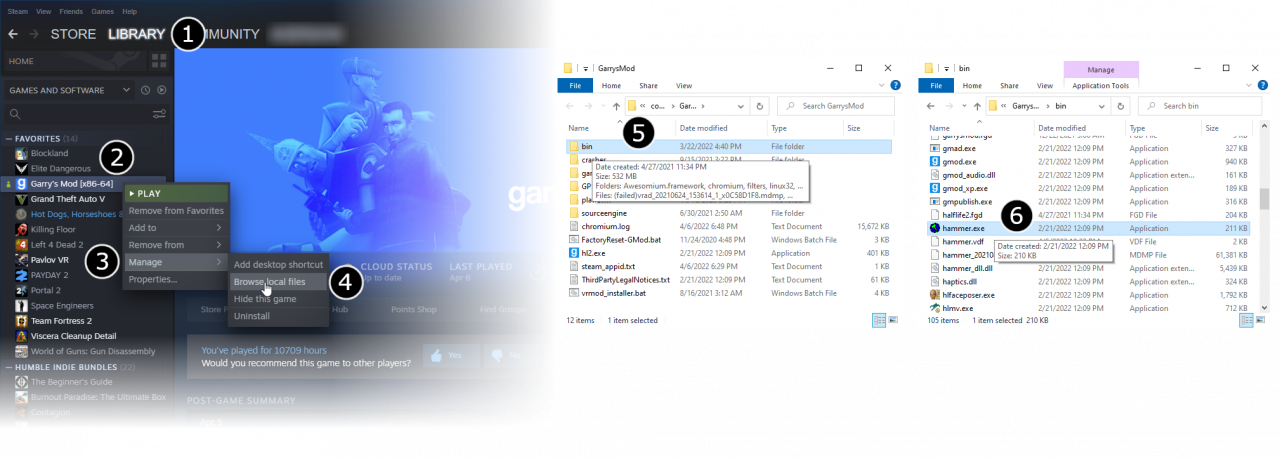
- Go to Steam’s Library tab (1), right click your game (2), hover over Manage to expand more options (3), and click Browse Local Files (4).
- From there, double click your game's
/binfolder to view it (5). - Find hammer.bat (or run hammer.exe if the latter doesn't exist) in this folder and double click it (6). This will launch Hammer, the level editor for Source.
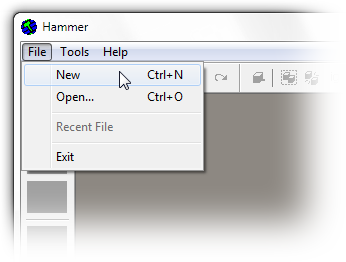
Note:Do not launch hammer.exe directly (unless if hammer.bat does not exist), as it might fail to detect the game automatically when launched for first time.- From the File menu, select New:
- An empty map will appear.

Bug:You may find that Hammer's viewports are all totally black. This is because Hammer is running with a different branch of Source from the game you are working on.Note:On Alien Swarm engine branch and later, you might need to run "Hammer Editor" through its SDK/Authoring Tools Launcher, as it may not open when running hammer.exe directly.