Basic Construction


Simple 3D solids (cubes, cylinders, etc.) are referred to as brushes inside the Hammer editor. These objects are the basic building blocks for all maps built for Source.
Floors, walls and ceilings—in short all geometry other than models—consist of brushes.
Contents
Creating brushes
- Select the Block tool
 .
. - Specify the size of your brush by clicking and dragging your mouse in the Top 2D View (the upper-right window pane by default) to create a box, as shown in Figure 2.
- Create the object by pressing ↵ Enter. Alternatively, right-click inside the brush and choose Create Object.
 Tip:If your object does not appear textured already, click on the Camera view and go to View > 3D Textured Polygons to view a textured version of your object.

Selecting brushes
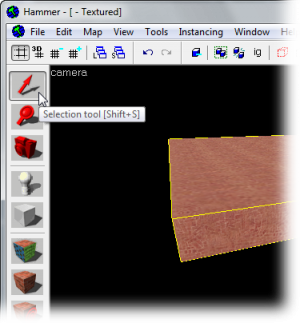
Click on the Selection tool  . It is used to isolate an object or group of objects you wish to manipulate. With the Selection Tool active, highlight your brush by clicking on it in one of the windows. (In a 2D window click on the edges or center of the brush. In the Camera view, click anywhere on the object.)
You will notice that the selected brush will be highlighted with red and will get eight little white square handles in the 2D views. These handles allow you to rotate and transform the selection (see below).
Note that the brush looks like a 3D wireframe box. Flatten the box so that it looks like a thin slab and move it so that the camera is above it. Think of the brush as a 3D chunk of ceiling or floor or wall, not a room all by itself. It takes 6 brushes to make a room.
Tip:Hold Ctrl to select multiple objects.The Grid
A grid is displayed in all the 2D views. By default, all objects snap to the grid. Although you can turn this off by pressing ⇧ Shift+W, it is considered good practice to leave it on because it prevents leaks and other errors in your map.
The default grid size is 64 units, which means that each line is 64 units apart. You can change the grid size by:
- Pressing [ or Alt+A or clicking the Smaller Grid icon
 . This will make the grid half as small as before, allowing finer adjustments.
 - Pressing ] or Alt+S or clicking the Larger Grid icon
 . This will make the grid twice as big, for larger adjustments.
To help determine the appropriate scales needed for a playable map, please see the article on Dimensions.
Resize, Rotate, & Skew
 Important:All three of the following operations can cause vertices to land off grid which normally is to be avoided, especially for world brushes. Resizing and skewing single axis-aligned cuboids for example is never problematic whereas rotating any brush by any angle other than 0, 90, 180, ... degrees always results in vertices off grid. Sometimes the Vertex tool
  is what you are actually looking for.
Resize
- Scales the selection. Select a brush using the Selection tool and mouse over one of its eight white handles. The cursor should change to arrows, indicating along which axis you can move that handle. To resize, simply click and drag one of these handles.
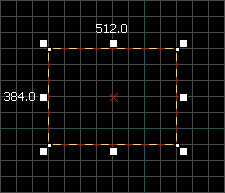 White squares on each corner mean the brush can be resized.
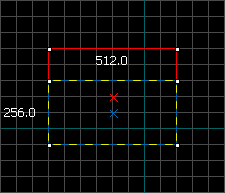 Click and drag the edge up or down in any 2D view to resize.


Rotate
- Spins the selection. Select the object you wish to rotate using the Selection tool , then click on the object once again. You should see the squares surrounding the object at the corners turn into circles.
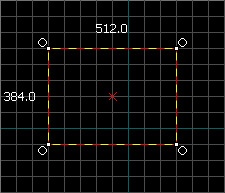 Circles on each corner mean the brush can be rotated.
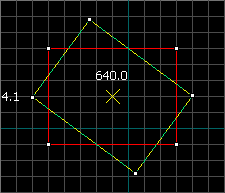 Click and drag in a circle in any 2D view to rotate.


Skew
- Distorts the selection along an axis. Select the object you wish to skew using the Selection tool , then click twice on the object. You should see small white squares at the center of each edge of the object.
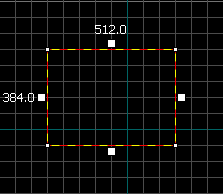 White squares at the center of each edge mean the brush can be skewed.
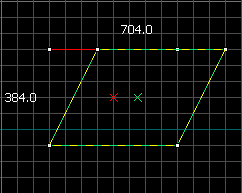 Click & drag a white square in any 2D view to skew.


