
phys_ballsocket
Jump to navigation
Jump to search

 Note:Torque limit is always 0 (infinite) for this entity.
 Class hierarchy Class hierarchy
|
|---|
| CPhysBallSocket |
| physconstraint.cpp
|
phys_ballsocket is a point entity available in all  Source games. It simulates a rigid connection between the centre of its constrained entities and its own location that prevents them from changing relative distance and makes their rotation point its own location.
Most constraints, if given two entities, will constrain them directly to each other; phys_ballsocket will constrain them to itself. Despite this slightly different behaviour however, the entity still won't remain at a fixed location when two entities are attached.
Source games. It simulates a rigid connection between the centre of its constrained entities and its own location that prevents them from changing relative distance and makes their rotation point its own location.
Most constraints, if given two entities, will constrain them directly to each other; phys_ballsocket will constrain them to itself. Despite this slightly different behaviour however, the entity still won't remain at a fixed location when two entities are attached.
Todo: Can you constrain the constraint?
Note:Torque limit is always 0 (infinite) for this entity.Example map: sourcesdk_content\hl2\mapsrc\sdk_phys_ballsocket.vmf

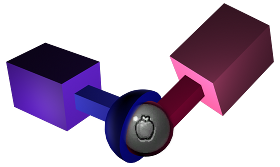
The joint simulated by phys_ballsocket. Note that Source permits a full 360° of movement since the constraint itself has no physical presence.
Keyvalues
TwoObjectPhysics:
- Entity 1 (attach1) <targetname>
- Entity 2 (attach2) <targetname>
- The entities to constrain. Leave one or the other field blank to constrain to the world. Note:Only one entity will be constrained, even if several share the given targetname.
- Constraint System Manager (constraintsystem) <targetname>
- A phys_constraintsystem that this constraint should be a part of. This avoids the "jiggling" caused by constraints applied to the same set of entities fighting with each other.
- Force Limit to Break (forcelimit) <float>
- Impact force required to break the constraint, in pounds. 0 means infinite. A way of calculating this is to set it to the weight of an object that would break the constraint if it were resting on its objects.
- Torque Limit to Break (torquelimit) <float>
- Torque required to break the constraint, in pounds*inches. 0 means infinite. A way of calculating this is to multiply any reference mass by the resting distance (from the center of mass of the object) needed to break the constraint.
- Play Sound on Break (breaksound) <string>
- A sound played when the constraint is broken.
- Follow teleport distance (teleportfollowdistance) <float>
- If one constrained object teleports more than this many units away, the other will teleport with it.
Flags
- No Collision until break : [1]
- Start inactive : [4]
- Change mass to keep stable attachment to world : [8]
- Do not connect entities until turned on : [16]
Inputs
TwoObjectPhysics:
- Break
- Force the constraint to break.
- TurnOn
- Enable the constraint; do this if the constrained objects don't exist when it spawns. Note that broken constraints cannot be turned back on as they have been deleted.
- TurnOff
- Disable the constraint.
Outputs
TwoObjectPhysics:
- OnBreak
- Fired when the constraint breaks.