func_portal_bumper


... 


func_portal_bumper is a brush entity available in the  Portal games.
Entity description
It tells Portal to 'bump' portals that cannot open inside it away. Use it when a portal-proof surface runs directly on to a portal-friendly one.
While having this is not absolutely necessary, it does make your puzzles much more user friendly. You don't need to use one if there is an angle in the surface (e.g. the corners of a room).
 Note:Each func_portal_bumper must stick at least two units out from the surface.
Usage
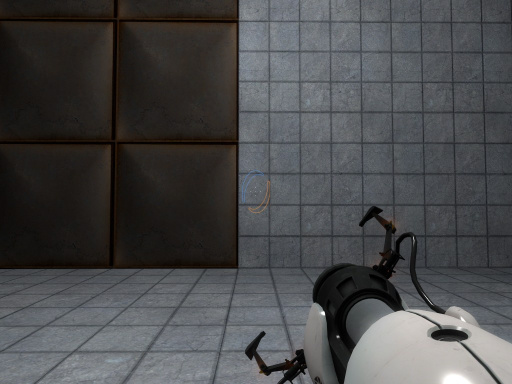
Not using a portal bumper
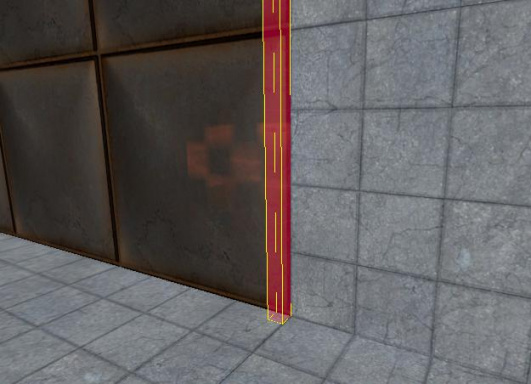
How to place the bumper in Hammer
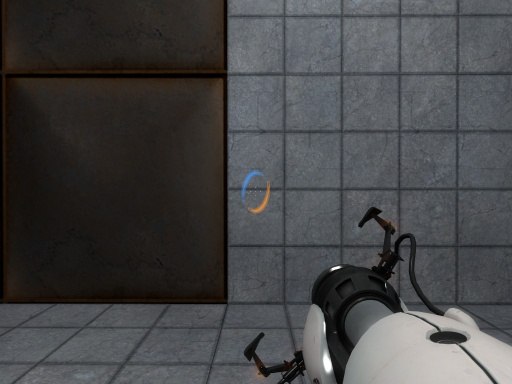
The result - a portal will be bumped to fit on the concret


Keyvalues
Targetname:
- Name
(targetname)<string> - The targetname that other entities refer to this entity by.
Parentname:
- Parent
(parentname)<targetname> - Specifies a movement parent. An entity will maintain its initial offset from its parent. An attachment point can be added to the end of the name, separated by a comma.
Flags
- [
1] : Start inactive
Inputs
Deactivate- Turn off bumping functionality
Activate- Turn on bumping functionality
Toggle- Toggle bumping functionality
Base:
AddContext<string>- Adds to the entity's list of response contexts. See Context.
AddOutput<string>- Assigns a new keyvalue/output on this entity. For keyvalues, some rely on extra necessary code to be ran and won't work if its simply just changed through this input. There is a strict format that must be followed:
// Format of changing KeyValues: "AddOutput [key] [value]"
//// Raw text:
"OnUser1" "!self,AddOutput,targetname new_name"

// Format of adding an Output: "AddOutput {targetname}:{inputname}:{parameter}:{delay}:{max times to fire, -1 means infinite}"
//// Raw text:
"OnUser1" "!self,AddOutput,OnUser1:SetParent:!activator:0.0:-1"
// Arguments can be left blank, but the empty blank should still be contained.
//// Raw text:
"OnUser1" "!self,AddOutput,OnUser1:ClearParent::0.0:-1"
|
ClearContext- Removes all contexts from this entity's list.
ClearParent- Removes this entity from the the movement hierarchy, leaving it free to move independently.
FireUser1toFireUser4- Fires the respective
OnUseroutputs; see User Inputs and Outputs.
Kill- Removes this entity and any entities parented to it from the world.
KillHierarchy- Functions the same as
Kill, although this entity and any entities parented to it are killed on the same frame, being marginally faster thanKillinput.
RemoveContext<string>- Remove a context from this entity's list. The name should match the key of an existing context.
SetParent<string>- Move with this entity. See Entity Hierarchy (parenting).
SetParentAttachment<string>- Change this entity to attach to a specific attachment point on its parent. The entity will teleport so that the position of its root bone matches that of the attachment. Entities must be parented before being sent this input.
SetParentAttachmentMaintainOffset<string>- As above, but without teleporting. The entity retains its position relative to the attachment at the time of the input being received.
DispatchResponse<string> !FGD- Dispatches a response to the entity. See Response and Concept.
DispatchEffect<string> (removed since ) !FGD
- Dispatches a special effect from the entity's origin; See also List of Client Effects. Replaced by the particle system since .
RunScriptFile<script> (in all games since ) (also in
  )
)- Execute a VScript file from disk, without file extension. The script contents are merged with the script scope of the receiving entity.
RunScriptCode<string> (in all games since) (also in )- Execute a string of VScript source code in the scope of the entity receiving the input. String quotation may be needed when fired via console.
 Bug:In Hammer, using string arguments will corrupt the VMF file's structure, making the file unviewable for the next Hammer session.Fix:Remove the string argument manually with a text editor.Note: Backtick characters ` are replaced with quotation marks at runtime, allowing quotation marks to be used when normally not possible.
CallScriptFunction<string> (in all games since) (also in ) !FGD- Calls a VScript function defined in the scope of the receiving entity.
TerminateScriptScope(only in) !FGD- Destroys the script scope of the receving entity.
SetLocalOrigin<coordinates> (in all games since ) !FGD
- Send this entity to a spot in the map. If the entity is parented to something, it will be offset from the parent by this amount.
Parentname:
SetParent<string>- Move with this entity. See Entity Hierarchy (parenting).
SetParentAttachment<string>- Change this entity to attach to a specific attachment point on its parent. The entity will teleport so that the position of its root bone matches that of the attachment. Entities must be parented before being sent this input.
SetParentAttachmentMaintainOffset<string>- As above, but without teleporting. The entity retains its position relative to the attachment at the time of the input being received.
ClearParent- Removes this entity from the the movement hierarchy, leaving it free to move independently.
Outputs
Targetname:
OnUser1toOnUser4- These outputs each fire in response to the firing of the like-numbered
FireUser1toFireUser4Input; see User Inputs and Outputs.
OnKilled(only in)- This output fires when the entity is killed and removed from the game.
