
env_tonemap_controller

env_tonemap_controller is a point entity available in all  Source games.


…


It controls the HDR tonemapping for the player. Think of it as a method of controlling the exposure of the player's eyes. Tonemapping affect all players in multiplayer. HDR settings should normally be changed through triggers, whenever transitioning between environments of different light levels (or for multiplayer, at the start of the map via logic_auto).
 class hierarchy class hierarchy
|
|---|
CEnvTonemapController defined in env_tonemap_controller.cpp
|
 Note:
Note: Black Mesa use upgraded tonemapping with bloom which use a modified version of the Reinhard filter (in the game it is called next
 Next Generation Bloom, or Next Gen Bloom for short). Because of this, the results are very different from other Source Engine games. Old bloom and HDR still can be enabled with mat_bloom_nextgen 1. Important:If this entity is not in a map -
 Next Gen Bloom from Black Mesa will be broken if map is launched on a dedicated server (just like in the picture). There is probably a mechanism in the game that makes normal HDR if there is no env_tonemap_controller on a map, because when you run a map locally, everything looks fine. Probably this mechanism worked before with dedicated servers, but in the final release, something is broken. This is why you must to put this entity if you are creating a map for Black Mesa multiplayer.
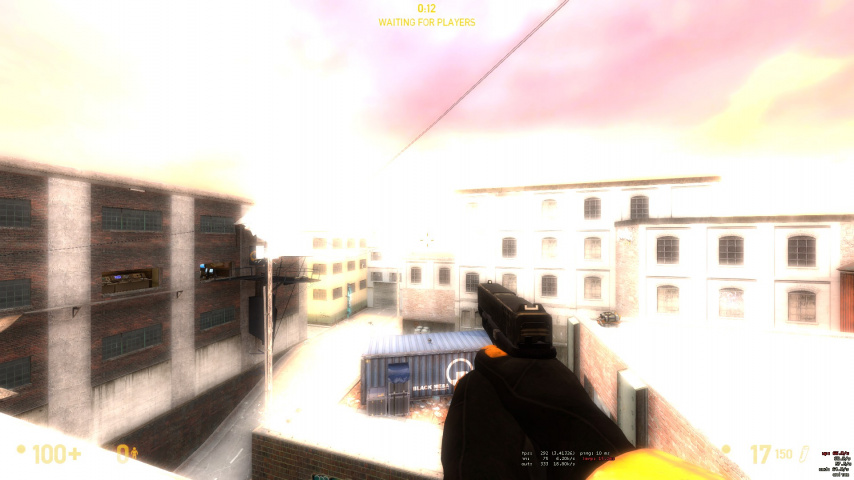
This is how HDR looks like the game in a dedicated server if env_tonemap_controller is not in the map.
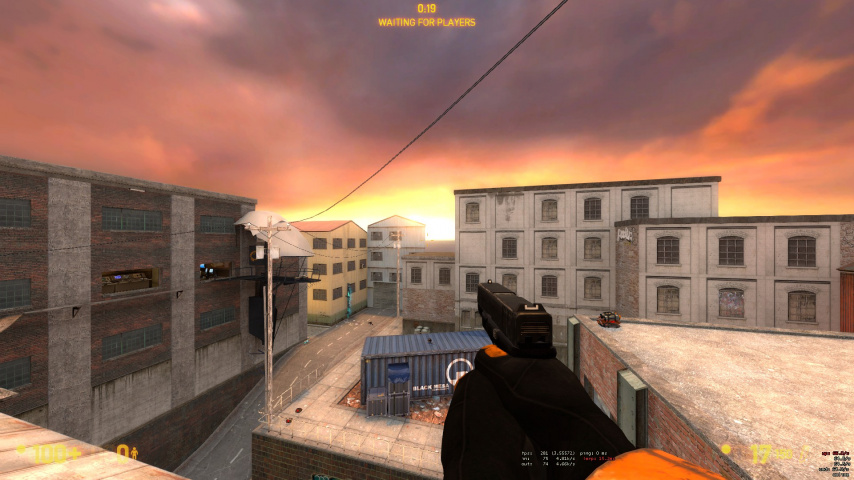
This is how HDR looks like the game in a dedicated server if env_tonemap_controller is in the map.


Represented by class CEnvTonemapController.
Flags
- [
1] : Master (Has priority if multipleenv_tonemap_controllerentities exist) (in all games since )
)
Keyvalues
Targetname:
- Name
(targetname)<string> - The targetname that other entities refer to this entity by.
- bUseNextGenBloom
(bUseNextGenBloom)<choices> (only in) -
- 0: NO
- 1: YES
- bUseCusBloomNG_Threshold
(bUseCusBloomNG_Threshold)<choices> (only in) -
- 0: NO
- 1: YES
Important:Most new Black Mesa keyvalues and I/O doesn't work if this keyvalue use choice NO.
|
|


- fCusBloomNG_Threshold
(fCusBloomNG_Threshold)<float> (only in) - Threshold for bright pass filter. Determines the influence of tonemapping; with high values, only brightest parts of frame will be bloomed.
- Note:The default value from fgd is 1, which is incorrect. The default value is 0.1.
- Note:A value of 0 means all pixels contribute to bloom, and is considered the most physically accurate setting.
- bUseCusBloomNG_tintExponent
(bUseCusBloomNG_tintExponent)<choices> (only in) -
- 0: NO
- 1: YES
- m_fCustomBloomNextGen_r
(m_fCustomBloomNextGen_r)<float> (only in) - Determines the influence for reder tones in frame.
- Note:The default value from fgd is 1, which is incorrect. The default value is 0.25.
- m_fCustomBloomNextGen_g
(m_fCustomBloomNextGen_g)<float> (only in) - Determines the influence for greener tones in frame.
- Note:The default value from fgd is 1, which is incorrect. The default value is 0.25.
- m_fCustomBloomNextGen_b
(m_fCustomBloomNextGen_b)<float> (only in) - Determines the influence for bluer tones in frame.
- Note:The default value from fgd is 1, which is incorrect. The default value is 0.25.
- m_fCusBloomNG_exponent
(m_fCusBloomNG_exponent)<float> (only in) - Determines the tightness of the bloom.
- Note:The default value from fgd is 1, which is incorrect. The default value is 2.2.
Inputs
SetTonemapScale<float> (not in )
)- Sets the player's tonemap scale. It should be a value between 0 and 2, where 0 is the eyes fully closed, 1 is use the unchanged autoexposure (default), and 2 is the eye fully wide open.
BlendTonemapScale<string> (not in)- Blends from the player's current tonemap scale to a new one. The parameter syntax is as follows:
<target tonemap scale> <blend duration>. For example:0.5 10would blend from the current tonemap scale to 0.5 over a period of 10 seconds.
UseDefaultAutoExposure- Reverts to using the default tonemap auto exposure.
UseDefaultBloomScale!FGD- Reverts to using the default bloom scale.
SetAutoExposureMin<float>- Sets a custom tonemap auto exposure minimum.
SetAutoExposureMax<float>- Sets a custom tonemap auto exposure maximum.
SetBloomScale<float>- Sets a custom bloom scale.
SetBloomScaleRange<vector> !FGD- Sets a range for the bloom scale. First number is the maximum, second number is the minimum.
 Bug:Broken. The code that processes this input has its formatting and source reversed.
SetTonemapRate<float>- Sets the rate for autoexposure adjustment (mat_hdr_manual_tonemap_rate).
SetBloomExponent<float> (in all games since)- Sets a custom bloom exponent.
SetBloomSaturation<float> (in all games since)- Sets a custom bloom saturation.
SetTonemapPercentBrightPixels<float> (only in )
)- Sets a target percentage of pixels to maintain above a certain brightness. (default: 1)
SetTonemapPercentTarget<float> (only in )- Sets the brightness that the percentage of pixels defined by
SetTonemapPercentBrightPixelsshould be kept above. (default: 45)
SetTonemapMinAvgLum<float> (only in )- Sets custom tonemapping param (default: 3).[Clarify]
InputSetBloomNxtGen_Threshold<float> (only in)- Sets the influence of tonemapping; with high values, only brightest parts of frame will be bloomed.
|
|


InputSetBloomNxtGen_TintR<float> (only in)- Sets the influence value for redder tones in frame.
|
|


InputSetBloomNxtGen_TintG<float> (only in)- Sets the influence value for greener tones in frame.
|
|

InputSetBloomNxtGen_TintB<float> (only in)- Sets the influence value for bluer tones in frame.
|
|

InputSetBloomNxtGen_Exponent<float> (only in)- Sets the brightness of the bloom.
|
|


See also
- HDR Lighting Settings
- BlackMesa XenEngine: Part2 – How a Frame is Rendered (Black Mesa developer describing how a frame is rendered, and discusses about the improvements for tone mapping.)
