
$bumpmap
Jump to navigation
Jump to search


 Warning:
 CS:GO engine branch.
Not enough data is stored in the vertices for normal mapping, so the engine has no choice but to fall back.
 Important:Bumpmapped brushes and displacements generate four lightmaps per-surface (one for each light direction, plus non-bumped version), instead of one. If
  Note:This does not apply to maps compiled using the
Important:
Note:
Note:This does not apply to maps compiled using the
Important:
Note:
 Bug:
Bug:


$bumpmap is a material shader parameter available in all  Source games.

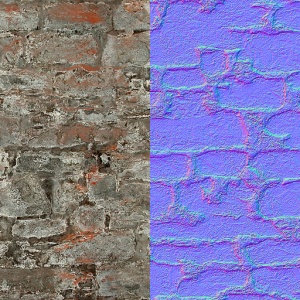
A material's albedo (left) compared to its bump map.

It specifies a texture that will provide three-dimensional lighting information for a material. The texture is a bump map, but the process it is used for is called  normal mapping. The two terms are often used interchangeably, however.
Warning:$bumpmap will disable prop_static's per-vertex lighting in every Source game before CS:GO engine branch.Not enough data is stored in the vertices for normal mapping, so the engine has no choice but to fall back.
Important:Bumpmapped brushes and displacements generate four lightmaps per-surface (one for each light direction, plus non-bumped version), instead of one. If $bumpmap or $normalmap is added to a VMT that did not have it at the time of compilation, the map must be recompiled.
Note:This does not apply to maps compiled using the -bumpall VBSP parameter (Which creates 4 lightmaps for all faces, regardless of if they are bumpmapped). This parameter should not be used often, however, as it significantly increases lightmap usage.Important:$bumpmap does not exist for LightmappedReflective. Use $normalmap instead.Note:
- In the
Watershader,$bumpmapis for a DX8 du/dv map. Use$normalmapinstead. - Bump maps cannot be used on decal textures except in CS:GO engine branch.
- On VertexLitGeneric using $lightwarptexture will force bumpmapping even if
$bumpmapis not in the VMT. A default one is bound instead, all$bumpmapcaveats come with it.
Bug: $bumpmap causes some other Parameters to not work. Parameters that will break with $bumpmap are ( but not limited to ) :
- Will not work with materials using $envmapmask. Except on VertexLitGeneric(only in
 ) and LightmappedGeneric(only in ). See Alternative methods.
 - In LightmappedGeneric, $detailblendmode 9 cannot be used.
- In VertexLitGeneric, $detailblendmode 5, 6, 8, 9, 10 and 11 not usable. With $phong 5 and 6 can be used.
- In


 VertexLitGeneric, $detailblendmode 5-11 not usable. With $phong 5 and 6 can be used.
 - In $detailtint won't work.
- $distancealpha, $outline, $softedges won't work.
- On LightmappedGeneric, cannot be used with $basealphaenvmapmask
Basic Syntax
LightmappedGeneric
{
	$basetexture	brick/brickwall021a
	$surfaceprop	brick
	$bumpmap		brick/brickwall021a_normal
}
Additional Parameters
Transforms the bump map texture.
Todo: Does this actually require DX9? Present in DX8 fallback shaders.
- The default position is
center .5 .5 scale 1 1 rotate 0 translate 0 0.centerdefines the point of rotation. Only useful ifrotateis being used.scalefits the texture into the material the given number of times.2 1is a 50% scale in the horizontal X axis while the vertical Y axis is still at original scale.rotaterotates the texture counter-clockwise in degrees. Accepts any number, including negatives.translateshifts the texture by the given numbers..5will shift it half-way. 1 will shift it once completely over, which is the same as not moving it at all.
- Note:All values must be included!
- Bug:Scaling the texture may cause odd issues where the Texture Lock tool in Hammer will not actually lock the texture in place. [todo tested in?]
- Bug:Rotating textures applied on brushes will rotate around the map origin (confirm: Orangebox engine only?). A fix for this is to change the center position in the VMT to the brush's origin. [todo tested in?]
The frame to start an animated bump map on.
Shader(s): LightmappedGeneric, Lightmapped_4WayBlend, WorldVertexTransition
Stops the bump map affecting the lighting of the material's albedo, which help combat overdraw. Does not affect the specular map, making it useful for distorted reflections on flat surfaces.
- Bug:Does not function beyond
 Source 2007.[confirm] [todo tested in?]
 - Note:Functions with $ssbump but not regular normals on Source 2013 . More testing required?

If 0, use bumpmapping if the card says it can handle it. If 1, always force bumpmapping on.
Shader(s): LightmappedGeneric, Lightmapped_4WayBlend, WorldVertexTransition

Force bump mapping on, even for low-end machines.
Shader(s): LightmappedGeneric
Enables the usage and blending of two bump maps together for LightmappedGeneric.
Shader(s): LightmappedGeneric, Lightmapped_4WayBlend, WorldVertexTransition
The second bump map to use, either for WorldVertexTransition or for for bump map blending.
LightmappedGeneric in for bump map blending.
Shader(s): LightmappedGeneric, Lightmapped_4WayBlend, WorldVertexTransition
Same as
$bumpframe, but for the second bump map.
Shader(s): LightmappedGeneric, Lightmapped_4WayBlend, WorldVertexTransition
Same as
$bumptransform, but for the second bump map.
- Note:$detail used with
$detailscalewill override this onLightmappedGenericif the shader is using$addbumpmaps.
If using two bump maps, use a third bump map to act as the base, with the alpha channel acting as a mask for the first two bump maps. The alpha channel of
$bumpmask is also used as a specular mask.
- Note:Only used by

materials/nature/toxicslime002a. - Note:Does not work with $detail and $seamless_scale.
Shader(s): LightmappedGeneric
The strength of the first and second bump maps for bump map blending.
Console Commands
- mat_fastnobump <boolean>
- Quickly enables/disabled normal mapping.
- mat_normalmaps <boolean>
- Displays the bump map texture of all materials that have one in place of their diffuse.
- mat_bumpmap <boolean>
- Enable or disable normal mapping. Default 1.